


The child care industry is not just about nurturing children; it’s also about maintaining an efficient financial structure to support your business, which you can do with child care accounting software. Whether you run a small in-home daycare or a large early childhood education center, streamlined billing and accounting processes are crucial in managing your financial transactions.
Let’s take a look at some child care billing and accounting features that you cannot afford to overlook.

Why Child Care Centers Need Accounting and Bookkeeping Software
Traditionally, many child care businesses have relied heavily on paper-based systems or standard spreadsheets to manage billing and accounting tasks. Unfortunately, these methods are not only labor-intensive but can also be prone to errors. Today’s child care businesses need to operate with precision, timeliness and transparency … and that’s where specialized billing and accounting software comes into play.
The 2024 Child Care Management Software Industry Trends Report from Procare Solutions found that many centers rely on dated payment forms, even as families seek the ease of automatic, digital payments. Plus, an astounding 43% of child care centers had experienced at least one rejected or declined transaction or bounced check when trying to collect tuition payments in the last month!
Take a look at the report’s findings on how families are making their tuition payments:
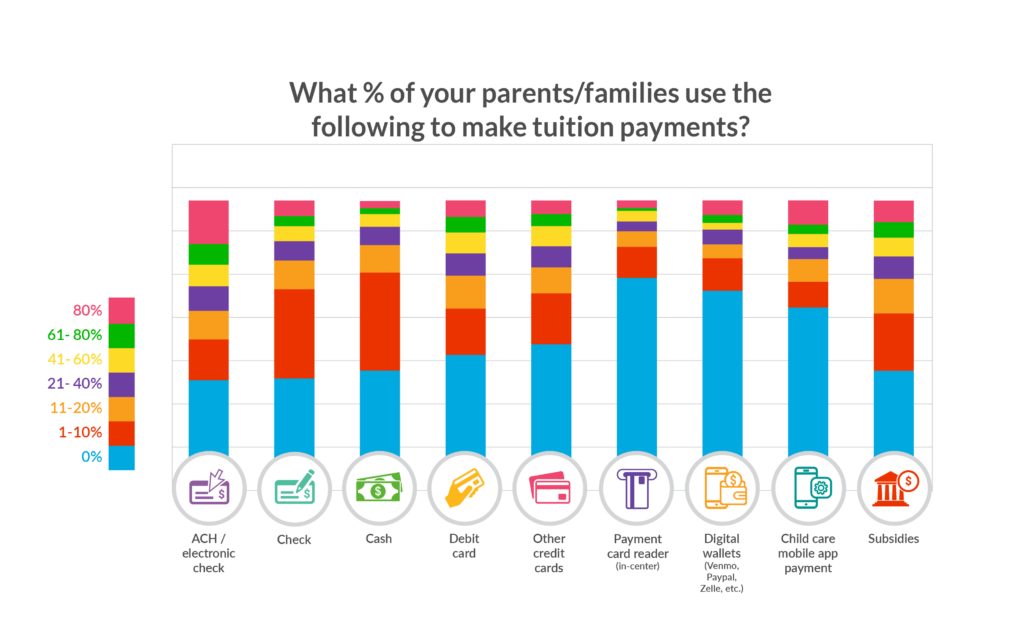
Using child care management software streamlines your operations, reduces your workload and minimizes the chances of billing inaccuracies. It also delivers on crucial security measures, keeping sensitive information safe while providing data-driven insights that inform business decisions.
What Are the Most Critical Features for Child Care Accounting Software to Address?
For a busy child care provider juggling many responsibilities, it’s important to find an all-in-one solution. And when assessing billing and accounting software for your child care business, it’s more than just simple number-crunching tools that are on the line.
Here’s a list of features you should look for:
Automated Recurring Billing
Child care billing can be incredibly complex and can involve different rates, multiple children and various funding sources.
An automated billing system is non-negotiable, ensuring that the right amount is billed correctly and without fail each cycle.
Take control of your tuition collection by initiating recurring payments on a weekly or monthly basis, or on a schedule of your choice. With Procare, payments transfer from each payer’s bank account or credit card (if applicable) directly to your account!
Procare also allows you to automate child care billing to record tuition charges, supply and activity fees, sibling discounts and co-payments and family discounts in seconds.
You can also manage hourly billing, overtime and late pickup fees with ease!
Payment Processing
Integrated payment-processing capabilities allow parents to pay tuition directly through your software, making for a more convenient and swift transaction.
This feature should support multiple payment types, including credit cards and ACH, an electronic fund transfer made between banks and credit unions.
Have peace of mind that payments will always come on time. Procare not only automates your child care invoicing – safely and securely – but also provides parents with frequent reminders and allows for flexibility with the payment methods you’re able to accept.
Electronic payments mean you’ll receive your funds faster!
Tracking Expenses With Robust Reporting

Effective tracking of expenses helps you to maintain a comprehensive budget and monitor cash flow. It’s helpful not just for understanding where your money goes but for preparing for any fluctuations in demand or unforeseen costs.
Eliminate the paperwork and hours of work that come with reconciling sign-in/out sheets through Procare’s integrated tracking software, which automatically updates families’ balances to ensure accurate billing.
The ability to generate detailed reports on revenue, expenses, attendance and any other pertinent financial data is key to making informed decisions. With Procare, you get multiple options for reports to help you make the best decisions for your business.
Use Procare’s daycare accounting software to pull reports with a few clicks of your mouse to help you make informed business decisions. Easily compile monthly and year-end tax statements, total revenue and income reports, balance sheets, customer statements and more, giving you a full picture of the health of your child care business.
Integration with Bookkeeping Software
Seamless integration with bookkeeping software like QuickBooks is a must. This saves time, minimizes redundancies and ensures that your financial statements are always updated in real time.
Procare Solutions partners with some of the most popular products and services that you use at your center, including Gusto and QuickBooks. For example, if your child care center uses QuickBooks or QuickBooks Online to manage your financials, you can integrate those programs into your Procare to export your family accounting, agency accounting and payroll transactions.
Save yourself hours while knowing your employees are all getting paid on time for theirs! Procare’s payroll and time clock software accurately tracks staff’s entry and exit times, automatically calculates all checks at once, leverages direct deposit functions and runs accurate summary reports.
Flexibility in Billing

A system that offers flexible billing options ensures you can cater to each family’s unique needs without complications.
Not all families will have the same payment setups; some may require split billing due to divorce or have their payments subsidized.
A recent Census Bureau report found that the number of children living only with their mothers has doubled in the last 50 years. It also found that the number of children living with their father only, although still small, more than quadrupled in that timeframe.
When a child has divorced or separated parents who are both responsible for child care payments, the situation can create additional hassles, both among the parents and the child care provider.
That’s why it’s helpful to have child care management software that offers multifamily or split-family payments.
Payment at Check-in
For flexibility and ease of use, a payment at check-in feature is invaluable. Parents can reconcile their bills on the spot, providing immediate payments to you.
Offering card payments provides the option of accepting these point-of-sale payments, such as at a center’s front desk or a kiosk. It is a convenient way to collect payments, although not as simple as setting up recurring tuition payments using a debit or credit card, or by ACH.
How Procare Can Help!
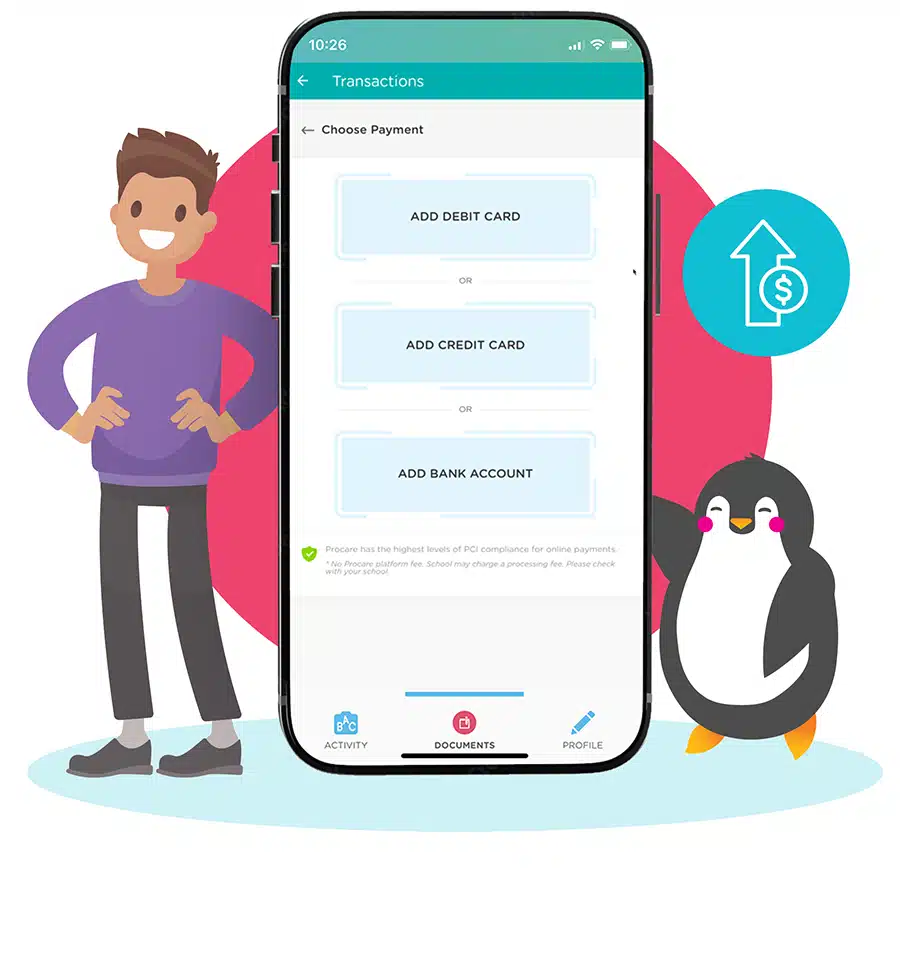
By incorporating the best billing and accounting features into your child care center’s software, you’re setting your business up for success, one billing cycle at a time.
Procare’s payment processing capability ensures flexibility by offering various payment methods. This allows your child care center to offer the payment methods that benefit your business while giving families the freedom to use the payment options they prefer. This facilitates a smooth and secure payment experience while addressing concerns related to rejected or declined payments.
With Procare, the child care bookkeeping features include:
- Process recurring tuition fees
- Link fees to child’s schedule
- Billing for divorced & subsidized families
- Financial history for each family account
- Record fees as a batch to specific groups
- Post late fees as a percentage or fixed amount
- Track deposits for summer, fall, etc.
- Print receipts automatically
- Complete audit trail / change log
With Procare, you can be confident when you tell families that their financial data, including credit card numbers and information related to ACH transactions, are being protected.
Procare is the only child care center management software with integrated proprietary payment processing. That means your daycare will always get low fees and dedicated support with fast funding at no additional charge.
Want to know how much time and money you could save with Procare payment processing? Enter some information into our online calculator to get an idea of your potential time and money savings!
Procare Cost and Time Savings Calculator Automated Payment Processing Cost & Time Savings Calculator Digital Curriculum Cost and Time Savings Calculator


Calculate your potential cost and time savings by using Procare’s all-in-one child care management software. All we will need from you is some information about your child care location*: Calculate your potential cost and time savings by using Procare’s secure and effortless child care payment processing. All we will need from you is some information about your child care location*: Calculate your potential cost and time savings by using Procare’s classroom management. All we will need from you is some information about your child care location*:
* Our data model is based on our experience working with over 100,000 child care centers, before and after school programs and youth organizations since 1992.

Switching to will save you hours and a month!*
| Manual | Procare | |||
|---|---|---|---|---|
| Time(hr/month) | Cost($/month) | Time(hr/month) | Cost($/month) | |
| Family Registration | ||||
| Attendance Tracking | ||||
| Family Communication and Engagement | ||||
| Financials | ||||
| Payment Processing | ||||
| Classroom Management |
| Family Registration | |||
|---|---|---|---|
| Manual | Procare | ||
| Time(hr/month) | Cost($/month) | Time(hr/month) | Cost($/month) |
| Attendance Tracking | |||
|---|---|---|---|
| Manual | Procare | ||
| Time(hr/month) | Cost($/month) | Time(hr/month) | Cost($/month) |
| Family Communication and Engagement | |||
|---|---|---|---|
| Manual | Procare | ||
| Time(hr/month) | Cost($/month) | Time(hr/month) | Cost($/month) |
| Financials | |||
|---|---|---|---|
| Manual | Procare | ||
| Time(hr/month) | Cost($/month) | Time(hr/month) | Cost($/month) |
| Payment Processing | |||
|---|---|---|---|
| Manual | Procare | ||
| Time(hr/month) | Cost($/month) | Time(hr/month) | Cost($/month) |
| Classroom Management | |||
|---|---|---|---|
| Manual | Procare | ||
| Time(hr/month) | Cost($/month) | Time(hr/month) | Cost($/month) |
We understand that smaller centers and in-home daycare providers are operating on a tight budget, and that is why we provide all these features for the affordable price of just $25 per month. Let us handle the business of child care so you can get back to caring for your children.
To learn more about Procare home version, click below.
*Please note that the report you see only factors in cost and time savings for the in-home solution features. For Procare home version users that are interested in seeing how they can benefit from Procare’s full suite of capabilities, contact us today to speak to a Procare representative. *Please note that the report you see only factors in cost and time savings for the in-home solution features. For Procare home version users that are interested in seeing how they can benefit from Procare’s full suite of capabilities, contact us today to speak to a Procare representative. *Please note that the classroom management functionality is not available for in-home users. For Procare home version users that are interested in seeing how they can benefit from Procare’s full suite of capabilities, contact us today to speak to a Procare representative.


| Cost & Time Savings | |
|---|---|
| Date | |
| Automation | |
| Number of Staff | |
| Number of Students | |
| Hourly Rate | |
| Savings per Month | |
Procare Cost and Time Savings Calculator
| Family Registration | Manual | Procare | ||
|---|---|---|---|---|
| Task | Time(hr/month) | Cost($/month) | Time(hr/month) | Cost($/month) |
| Enrollment | ||||
| Waitlist / Lead Management | ||||
| eDocuments | ||||
| Family Data Entry / Management | ||||
| Health and Immunization Records | ||||
| Total per month |
| Attendance Tracking | Manual | Procare | ||
|---|---|---|---|---|
| Task | Time(hr/month) | Cost($/month) | Time(hr/month) | Cost($/month) |
| Check-in/Check-out | ||||
| Class Roster Management | ||||
| Teacher-Student Ratio Tracking | ||||
| Total per month |
| Family Communication and Engagement | Manual | Procare | ||
|---|---|---|---|---|
| Task | Time(hr/month) | Cost($/month) | Time(hr/month) | Cost($/month) |
| Child Activity Tracking | ||||
| Family Messaging | ||||
| Staff Messaging | ||||
| Meal Planning | ||||
| Total per month |
| Financials | Manual | Procare | ||
|---|---|---|---|---|
| Task | Time(hr/month) | Cost($/month) | Time(hr/month) | Cost($/month) |
| Payroll | ||||
| Financial Reporting | ||||
| Business Planning and Reporting | ||||
| Staff Time Tracking / Scheduling | ||||
| Total per month |